
Device Down or Just Unreachable? How to Tell the Difference Before You Send Someone Out
A missed check-in and a real failure look identical on the screen — but one needs a truck and a spare part, the other might be fixable from a desk. A practical framework for telling them apart: what each diagnostic check actually proves, how to set wait times by the real cost of being wrong, and when to stop guessing and force a definite answer.


Ask a group of automation people how they know if a device is really broken or just cut off from the network, and you'll get a long list of answers: watch a hardwired contact, wait out a timer, count failed retries, check a counter that moves on its own. On the surface it looks like everyone has a different method.
Look closer, and most of these methods are answering different questions, not competing with each other. This post pulls them together: what each check actually proves, why the wait time before you call something "dead" should come from the cost of being wrong, and why the honest answer for some sites is simply to send someone out anyway.
Why the difference actually matters
When a device stops answering, the reading on the screen looks the same whether the equipment failed or only the path to it died. But the two problems call for very different responses. A dead device usually means a truck and a spare part. A dead link might be something you can fix from a desk, or something that can wait for the next planned visit.
Get this wrong in one direction and someone drives two hours to find a machine that was running the whole time. Get it wrong in the other direction and a real failure sits untouched because everyone assumed it was "just the network."
The first split: does the device need you to know it's there?
Not every device fails the same way when it loses contact. Some devices, like a PLC running part of a plant on its own, keep doing their job with or without a live connection back to the control room. Others, like a drive that's supposed to react immediately to commands, are effectively broken the moment the link goes down, because a well-built drive should already move to a safe state when it stops hearing from its controller.
This split changes the whole question. For a device that depends on the link to do its job, "unreachable" and "down" really are close to the same problem. For a device that can keep running on its own, the better question isn't "can I reach it" but "is the thing it's responsible for still working the way it should." If a self-contained part of the plant has its own local safety checks, losing the view into it from a distance may be far less urgent than losing the ability to see whether material is piling up or output has stopped.
Set the wait time by what actually happens if you're wrong
A common mistake is picking one wait time for everything, then arguing about whether it should be thirty seconds or five minutes. A better approach is to ask, for each part of the plant: what actually happens if this stays quiet for a while?
If nothing bad happens for twenty minutes, the wait time can be twenty minutes. If material starts backing up after two minutes, the wait time should be two minutes. The number isn't the point. The point is working backward from the real consequence of not knowing, which is closer to a simple risk review than a guess.
Five checks worth having, and what each one actually proves
None of these checks answer the same question, which is why using just one tends to leave gaps.
- Hardwired fail contacts. A simple wired signal that doesn't depend on any network protocol at all. This matters because if the problem is the protocol layer itself, every check that relies on that same protocol goes blind at the same time. A hardwired contact is the one signal that keeps working when everything else doesn't.
- A wait timer before calling it dead. Reacting to a single missed check-in causes false alarms. Waiting for a longer, deliberate gap filters out normal blips and only flags something once it's actually been quiet for the length of time that matters.
- Counting failed attempts. A device that answers some of the time and not other times is usually pointing at a weak or noisy connection, not a device that's actually failed. A device that answers zero times over many tries looks more like a real failure.
- Reading a value that moves on its own. If a device sits behind a meter, counter, or level reading that keeps changing on a separate path while the device itself is silent, that's strong evidence the equipment kept working and only the visibility into it was lost. The same idea shows up in process readings too: if a tank level keeps dropping the way it should, the pump behind it is probably still running even though you can't see it directly.
- A watchdog timer running on the device itself. Instead of waiting for someone else to notice the silence, the device is set up to notice its own silence. If it stops hearing from its own program or controller for a set time, it forces itself into a safe, known state on its own, rather than sitting in an unknown one until a person or a remote system catches up. This is a smaller, cheaper safety net that works even before any of the checks above get involved.

Find out where the break actually is before you decide anything
Before deciding a single device has failed, it's worth checking whether everything sitting behind the same upstream box went quiet at the same moment. If a whole group of devices dropped together, the shared path is the more likely problem, not each device individually.
Network-level tools help narrow this down further:
- Switch and port status. Whether a port is up, and whether it's throwing errors, is often the fastest remote check available.
- Packet-level tools. Looking at link errors and whether normal background traffic is present at all can point to a physical path problem before you assume the device itself failed.
- A dedicated monitoring system with alarms, built the same way a plant floor is monitored, but pointed at the network itself: switches, servers, and the links between them. Paired with a central log server, this lets you see when a port changed state and line it up against when the device went quiet. This does need managed switches and some monitoring software in place, which not every site has.
- Building a clear chain of checkpoints along the path, so a fault can be narrowed down to the link, the wiring, or the device itself instead of staying a single unknown. In practice this can be as simple as a signal that passes through each stage of the path in turn — the wiring, the local panel, the remote unit — so that when something goes quiet, you can see exactly how far the signal got before it stopped, instead of only knowing that it did.
When it really matters, force a clear answer instead of guessing
Sometimes the honest position is that you can't tell from where you're sitting, and the only way to know for certain is to test it directly. The most reliable way to confirm something is working is to check whether the actual effect it's supposed to produce is happening, ideally through a completely separate path and power supply from the device itself. If you're testing a device using the same network and power that might already be the problem, the test isn't fully trustworthy.
When the ambiguity really can't be resolved remotely and the stakes are high enough, cutting power to the device is a blunt but effective way to force a definite answer instead of relying on inference. If it was reachable and now clearly isn't, you know exactly where you stand — as long as whatever is doing the cutting is on its own separate path, or you can't be sure the power was actually cut either.
This idea isn't unique to industrial settings. Teams that run large-scale computing systems use the same approach under different names, isolating a suspect system and confirming its state directly rather than trusting a link that might be the actual problem.

Some things never change
For all the available checks, two things from the more experienced voices are worth keeping in mind. First, physical inspection is still the final word — walking up to a device and looking at its status lights settles the question outright. Second, in plenty of real operations, the distinction barely matters day to day: if a device is unreachable, someone has to go find out why regardless of the cause, so the practical goal isn't a perfect diagnosis every time. It's avoiding the unnecessary trips where the answer really was available in advance.
How INSUS approaches it
We treat "is it down or just quiet" as a design question for the monitoring and alarm layer, not something to patch in after the fact:
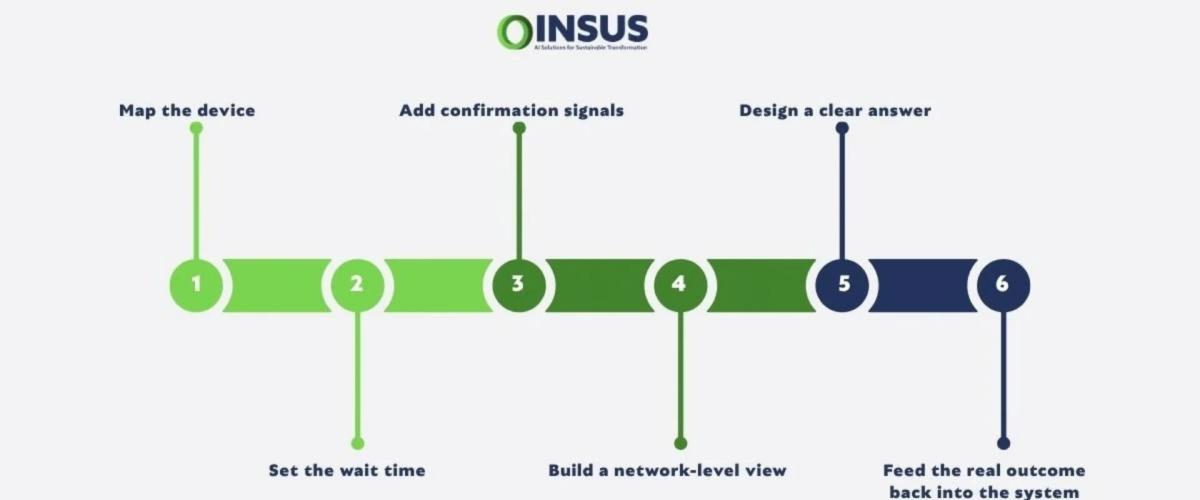
- Map which devices are self-sufficient and which depend on a live connection to do their job, and note what local safety already exists, before setting any timers.
- Set the wait time separately for each device or group, based on what actually happens if it stays silent, rather than applying one number everywhere.
- Add at least one independent confirmation signal — a hardwired contact, a counter, or a downstream process value — wherever a wrong dispatch decision is costly.
- Build a network-level view alongside the device-level one, so an alarm can be checked against "is the whole path down" before anyone is sent out.
- Where the cost of guessing wrong is high enough, design in a way to force a clear answer rather than escalate on an assumption.
- Feed the real outcome back into the system afterward — was it the device or the link — so the thresholds get better over time instead of staying fixed forever.
The real question isn't "reachable or down"
It's whether the response matches what's actually happening. A single missed check-in isn't a failure, and a genuinely dead device dressed up as a communications hiccup isn't a minor issue either. Getting this right isn't about one clever check — it's a handful of signals, set up with the actual cost of being wrong in mind, and a plan that only sends a truck when a truck is really needed.
Where to start
A missed check-in isn't proof of anything — it's just missing information. Whether the response is right or wrong is a design question for the monitoring and alarm layer, not something to fix after a bad dispatch decision. INSUS works from that starting point: mapping which devices are self-sufficient versus link-dependent, setting wait times by the real cost of being wrong for each one, and building the independent confirmation signals that turn a guess into an actual answer.
If you want a second look at how your sites currently decide "down or just quiet," talk to our team.